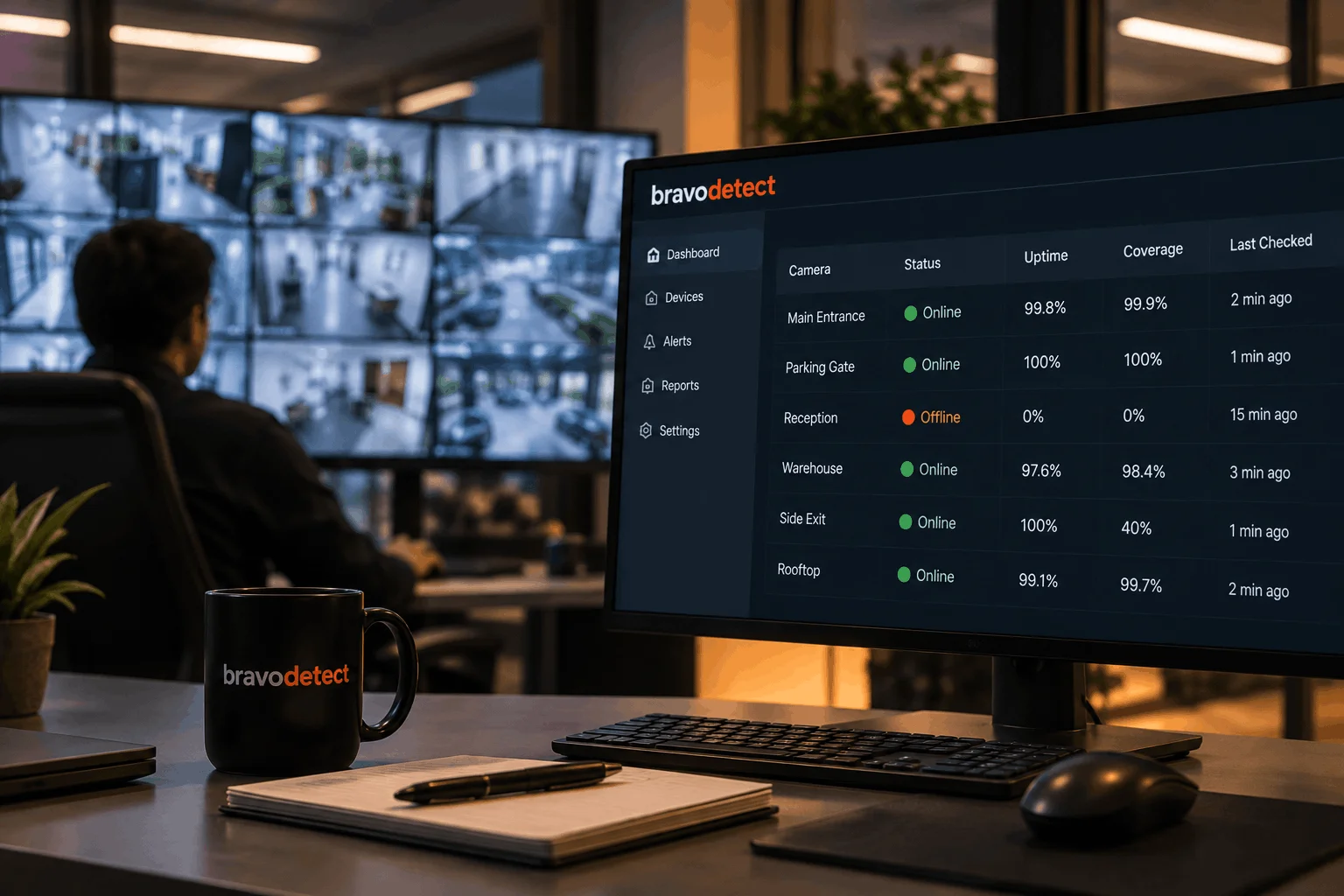
Ask any monitoring tool for a device’s uptime and it will happily give you a number: 99.8%, 100%, 97.3%. That number feels solid. It is also, on its own, close to meaningless. CCTV uptime monitoring only tells you how reliable a camera appeared during the period it was actually being monitored. Without knowing how much of the reporting period was covered, the percentage can give a misleading impression of reliability.
For security teams, facilities managers and compliance teams, uptime should always be considered alongside monitoring coverage.
The Two-Hour Problem
Here is a scenario that comes up more often than it should. A camera appears in a weekly report with 100% uptime. On paper, that looks perfect. In reality, the monitoring agent for that device only came online two hours before the report was generated.
Perhaps the camera was added late. Perhaps the monitoring service restarted. Maybe the device changed its IP address and temporarily stopped matching its existing record. Whatever the reason, the system only observed the camera for a small part of the reporting period.
The device was available for every minute it was actually checked. It simply was not checked for most of the week.
A 100% uptime figure based on two hours of observation tells you very little about the other 166 hours.
One number is a grade. Two numbers are evidence.
This distinction becomes particularly important when uptime reports are used for operational reviews, maintenance planning, insurance documentation or compliance evidence.
Why Monitoring Coverage Is the Missing Half
Coverage answers a different question from uptime.
Uptime asks: Of the time we monitored the device, how much of that time was it available?
Coverage asks: How much of the total reporting period did we actually monitor the device?
Both measurements are important.
Imagine two cameras:
- Camera A: 92% uptime and 99% coverage
- Camera B: 100% uptime and 40% coverage
Camera A has a lower uptime percentage, but the organization has observed almost the entire reporting period. Its 92% figure therefore provides useful evidence about actual availability.
Camera B appears perfect, but only 40% of the reporting window was observed. The remaining 60% is unknown. A 100% uptime figure cannot tell you what happened during those unmonitored periods.
This is why reliable CCTV uptime monitoring should make coverage visible instead of silently excluding monitoring gaps.
What Can Cause Monitoring Gaps?
Coverage can fall for several reasons, and not all of them indicate a camera failure.
A device may have been newly added to the monitoring system. A monitoring service may have been restarted. Network configuration may have changed. An IP address may have been reassigned. Maintenance could temporarily interrupt polling. A monitoring server itself could also experience an interruption.
These situations are important because a monitoring gap and a camera outage are not necessarily the same thing.
If a system simply removes the gap from its calculations, the resulting uptime percentage may look better than the available evidence actually supports.
A useful monitoring platform should therefore record the observation period and distinguish between device downtime and monitoring downtime.
How bravodetect Reports Uptime and Coverage
bravodetect, designed and developed by ScoreTech Vision, is built to make both sides of the measurement visible. Its monitoring reports can show uptime and coverage together for individual devices, buildings and selected reporting periods.
This provides additional context around every percentage.
For example, a facilities team reviewing a camera with 100% uptime can also check whether the device was monitored throughout the entire reporting window. If coverage is incomplete, the team knows that the uptime figure should not be interpreted as proof that the camera was continuously available.
Monitoring gaps are treated as gaps rather than silently disappearing from the calculation, helping teams maintain a clearer and more reliable view of CCTV device availability.
Why Coverage Matters for Large CCTV Networks
The importance of coverage increases as the number of monitored devices grows.
A small installation may contain a few dozen cameras that a technician can manually investigate. A large campus, industrial facility or multi-site organization may have hundreds or thousands of IP devices.
At that scale, monitoring data becomes part of the operational record.
If several devices show unusually high uptime but have inconsistent monitoring coverage, the organization needs to know that before using those numbers to assess performance.
Likewise, if an entire building shows a sudden drop in coverage, the issue may be related to the monitoring infrastructure rather than the cameras themselves.
This distinction helps security and facilities teams investigate the right problem instead of assuming that every reporting anomaly represents a device failure.
What to Ask Your Current Monitoring Vendor
If you already use a CCTV or IP device monitoring platform, there is a simple question worth asking:
“What was the monitoring coverage behind last month’s uptime percentage?”
If the platform can provide both figures, you have more context for interpreting its reports.
If it only provides an uptime percentage without showing how much of the reporting period was actually observed, you may not know whether that number represents a complete monitoring record or only the periods when the system was watching.
Good CCTV uptime monitoring should not simply produce an impressive percentage. It should show enough information for teams to understand how that percentage was calculated.
Uptime Needs Context
Uptime is useful, but uptime alone is not the complete picture.
A reliable monitoring report should tell you both how well the device performed and how much of the reporting period was actually observed.
Coverage provides that missing context.
For security teams, facilities managers and organizations that depend on accurate CCTV records, the goal should not be to produce the highest possible uptime percentage. The goal should be to produce a measurement that can be understood, investigated and trusted.
Ask any monitoring tool for a device’s uptime and it will happily give you a number: 99.8%, 100%, 97.3%. That number feels solid. It is also, on its own, close to meaningless.
The two hour problem
Here is a scenario that comes up more often than it should. A camera goes into a report as 100% uptime for the week. On paper, perfect. In reality, the monitoring agent for that device only came online two hours before the report was generated, because the device was added late, or the polling service restarted, or the device changed IP address and briefly stopped matching its record.
The device was up for every minute it was actually checked. It just was not checked for most of the week. A 100% figure built on two hours of observation tells you almost nothing about the other 166 hours.
One number is a grade. Two numbers are evidence.
Why coverage is the missing half
Coverage answers a different question from uptime. Uptime asks: of the time we watched, how much of it was the device working? Coverage asks: how much of the total window did we actually watch at all?
A device with 92% uptime and 99% coverage has been genuinely reliable, and you have the observation hours to back that claim. A device with 100% uptime and 40% coverage has told you almost nothing, and deserves a second look before anyone signs off on it.
How bravodetect reports it
- Every report shows uptime and coverage side by side, per device, per building, per time window
- Gaps in monitoring are logged as gaps, not silently excluded from the average
- “Up since last breakdown” gives a running total that a facilities team can act on immediately, separate from the percentage a compliance team wants to file
None of this requires more hardware. It requires the monitoring system to be honest about what it did and did not actually observe, and to show its working rather than hand over a single tidy number.
What to ask your current vendor
If you already have a monitoring tool, there is one simple test: ask it for the coverage percentage behind last month’s uptime figure. If it cannot answer, the uptime number it gave you was a guess wearing a grade.